
티스토리 뷰
"display"
❑ inline: 크기가 없고 글씨 공간을 차지
⇨ 컨텐츠의 크기 만큼만 차지
⇨ 줄바꿈 없이 한 줄에 다른 요소들과 나란치 배치
⇨ width, height 값을 지정해도 무시됨
⇨ margin, padding 값은 좌우 간격만 반영되고 상하 간격은 무시됨
❑ block: 한 줄의 너비를 전체 차지
⇨ 혼자 한 줄을 다 차지하고 있어 다른 요소들을 다음 줄로 밀어냄
⇨ width, height, margin, padding 속성 모두 반영됨
❑ inline-block:
⇨ inline(한 줄에 다른 요소들과 나란히 배치) + block(width, height, margin, padding 속성 반영)
⇨ 여러 요소들을 한 줄에 원하는 너비만큼 배치 (= 레이아웃 활용)
❑ visibility: hidden;
⇨ 자리는 남겨두고 사라짐
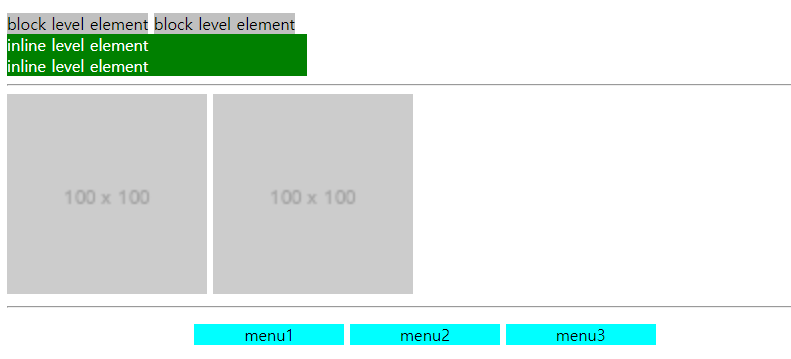
    <style>
        span {
            background: green;
            color: #fff;
            width: 300px;
            display: block;
        }
        .box{
            background-color: silver;
            width: 300px;
            display:inline;
        }
        img{
            width: 200px;
        }
        .menu{
            text-align: center;
        }
        .menu li{
            display:inline-block;
            width: 150px;
            background-color: aqua;
        }
    </style>
"overflow"
❑ overflow: auto
⇨ 넘치는 방향쪽으로 스크롤이 생김
❑ overflow: hidden
⇨ 넘치는 게 사라짐
❑ overflow: scroll
⇨ 넘치면 가로/세로 스크롤바 생김
❑ overflow-x / overflow-y
⇨ X축으로 넘칠 경우 잘리고 Y축으로 넘칠 경우 자연스럽게 사라짐
<style>
        div {
            width: 400px;
            border: 1px solid #ccc;
        }
        div p{
            width:450px;
        }
        .auto{
            overflow:auto;
        }
        .hidden{
            overflow:hidden;
        }
        .scroll{
            overflow:scroll;
        }
        .class{
            overflow-x:hidden;
        }
        .class2{
            height: 60px;
            overflow-y: hidden;
        }
</style>
"background"
# background-image
❑ 배경 이미지를 반영하면 초기값은 무조건 반복 배열 (= repeat)
       .class{
       		background-image:url(img/bg.png);
    	}
       .no-repeat{
            background-repeat: no-repeat;
        }
        /* 반복 막기 */
        .repeat-x{
            background-repeat: repeat-x;
        }
        /* x축으로 반복 */
        .repeat-y{
            background-repeat: repeat-y;
        }
        /* y축으로 반복 */
# background-attachment
# background-position
❑ background-position: 0 0
⇨ 배경 위치 기본값(속성값): 0(가로), 0(세로)
⇨ 기본값은 왼쪽 상단
⇨ pixel: 이미지의 왼쪽 기준
⇨ %: 0~100% 거리로 이동 (pixel과 다름)
.backgroundposition {
            width: 600px;
            height: 500px;
            background-image: url('img/ice.png');
            background-repeat: no-repeat;
            background-position: 50% 100%;
            /* 영문도 가능 ex) center top */
            border: 1px solid;
        }
# background-size
❑ 배경 포지션과 사이즈를 간략하게 적용시키는 법
⇨ background position/background size
❑ background만 쓸 경우 처음 속성을 다 덮음
❑ cover = object-fit
<style>
        .bg{
            width: 60%;
            height: 300px;
            background-image: url('img/bg.png');
            background-repeat: no-repeat;
            border: 1px solid;
        }

        .bg2{
            width: 60%;
            height: 300px;
       	   /*
         	background-repeat: no-repeat;
            background-position: center;
            background-size: 100%
            background-attachment: scroll;
            */
            background: url('img/bg.png') no-repeat silver 50%/100%;
            /* 50%(백그라운드 포지션)/100%(백그라운드 사이즈) */
            background-color: silver;
     	   }

      	 	/*
          	background-position:(영문은 순서 바꾸는 거 가능)
            background-position: center center; (=center;)
            background-position: top; (나머지 하나는 기본값 50%)
            */

            .bg2:hover{
                background-color: green;
            }

			.size1{
            background-size:200px;
        }
        	/* size=크기=가로축 맞춤 */

			.size2{
            background-size:100%;
        }

			.full{
            background-size: 100% 100%;
        }

        .contain{
            background-size:contain;
            height:600px;
        }
      	  /* 좁은쪽(가로or세로)에 100%를 맞춤 */

       .cover{
            background-size:cover;
            background-position:50% 0;
        }
        /* 이미지를 다 채움, 부모의 넓이가 고정값이 아닐 때 세로축이 줄어들지 않음 */
    </style>
</head>

<body>
    <h1>background size</h1>
    <h2>default auto</h2>
    <div class="bg"></div>
    <h2>가로측 200px</h2>
    <div class="bg fluid size1"></div>
    <h2>가로측 100%</h2>
    <div class="bg fluid size2"></div>
    <hr>
    <h2>100% 100%</h2>
    <div class="bg fluid full"></div>
    <h2>contain</h2>
    <div class="bg fluid contain"></div>
    <h2>가로측 100%</h2>
    <div class="bg fluid size2"></div>
    <h2>cover</h2>
    <div class="bg fluid cover"></div>
    <hr>
    <div class="bg2"></div>
</body>
'CSS' 카테고리의 다른 글
| shadow / gradient / transition / animation (0) | 2023.06.01 |
|---|---|
| position / z-index (0) | 2023.06.01 |
| float (0) | 2023.06.01 |
| 우선 순위 / font & text / vertical-align / list Style (0) | 2023.06.01 |
| CSS 기본문법 / colors / unit(단위) / 선택자 (0) | 2023.06.01 |